 Zency Scan
- Open Tools
Tap Tools in the tab bar at the bottom of the app.
- Tap Export to Word
Choose the document from your library — the box at the top searches by name or text.
- Export
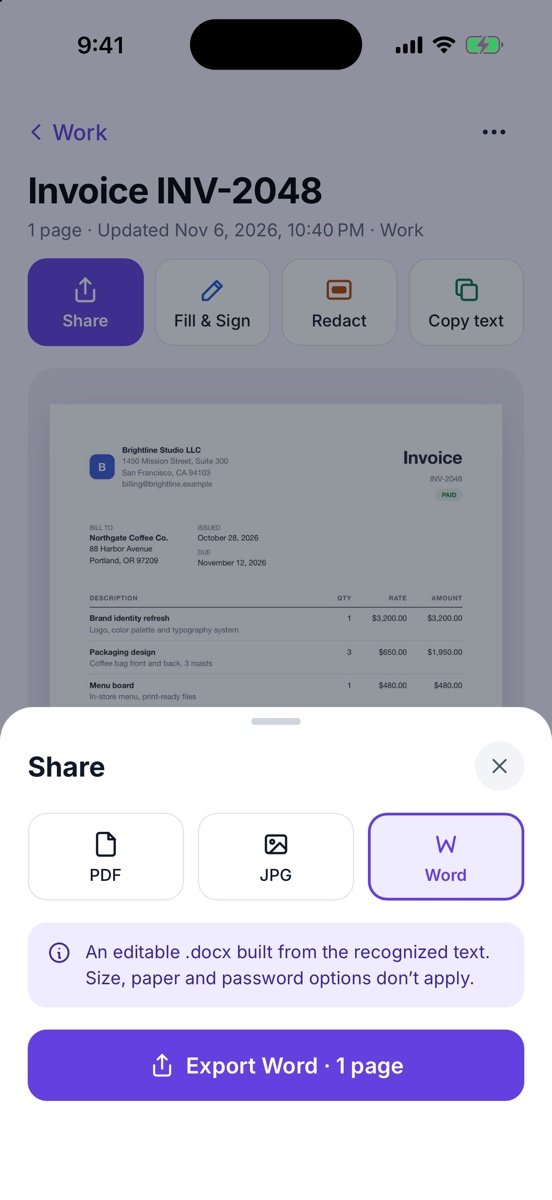
The Share sheet opens with Word selected. Tap Export Word · 1 page and pick where to send or save it.
Tips
- From inside a document you can also use … → Export to Word, or Share → Word.
- Word export keeps paragraphs in reading order. Tables and columns are not rebuilt — they come out as lines of text.
- This page has no text yet. means recognition hasn't finished, or the page has no printed text.
Free or Pro? Word export on the pages of your first 20 pages is free forever. For pages added after that, it needs Lifetime Pro ($7.99 once, no subscription).
See it in a real situation: Students: turn whiteboards, handouts and notes into searchable PDFs.