 Zency Scan
- Open Tools
Tap Tools in the tab bar at the bottom of the app.
- Tap Images to PDF
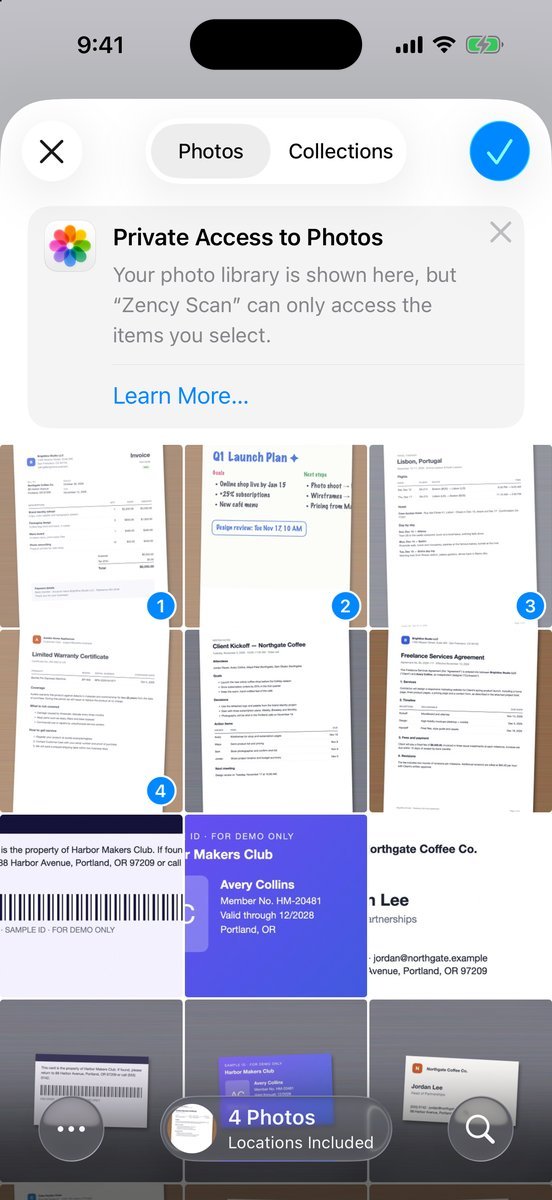
Your phone's photo picker opens straight away. Select the photos, in the order you want the pages.
- Check the order
Drag to change the order. Remove a photo with ✕ or add more with + From Photos.
- Pick paper and size
Paper: A4, Letter or Fit image. File size: Original, Under 5 MB, Under 2 MB (the default) or Under 1 MB.
- Convert
Tap Convert 4 files.
- Share or save the result
You see Converted and the new PDF. Turn on Password if the new PDF should ask for one. Tap Share to send it, or Save to Documents to keep it. The original file is never changed.
Tips
- Want each photo cropped and cleaned up like a scan? Use From Photos on the Scan screen instead — it finds the edges and applies a filter.
- Files are processed on your phone and never uploaded.
Free or Pro? This is free, with no watermark and no page limit.